Which Video Conferencing Camera Fits Your Team Best?
Ever join a call where half the team is blurry, the framing is off, and someone asks, “Can you see me now?” A video conferencing camera is no longer a nice-to-have; it usually shapes how professional, productive, and inclusive a meeting feels. Buyers want sharp optics, reliable USB connectivity, better audio integration, and easy setup—not just a spec sheet. So, should you choose a premium room camera or a portable all-in-one unit? Let’s break it down with real-world value in mind.
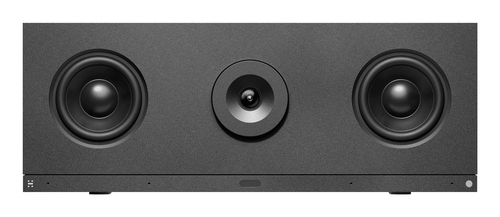
What Makes a Great Video Conferencing Camera Today?
When I help teams compare a video conferencing camera, I usually start with the basics: 1080p or higher resolution, field of view, low-light performance, autofocus, zoom, and true USB plug-and-play simplicity. Those are the features that affect daily use, not just marketing slides. In my experience, the best camera isn’t the one with the biggest numbers—it’s the one that fits the room, the table size, and the meeting style. A small huddle room needs something different than a long boardroom.
Frame rate and lens quality matter more than people think, especially during slide walks, product demos, or quick whiteboard sessions. A smooth image makes a video conferencing camera feel more natural, while a choppy one can make people tune out. Quick Wins: choose a model that works with your current platform, has solid mounting options, and won’t need constant tinkering. I’d also check room-ready camera options before getting lost in spec sheets. Premium units can be worth it, sure, but not if your team mostly runs casual calls from the same desk. Value comes from fewer frustrations—less setup, fewer dropped frames, fewer “why is this upside down?” moments. That’s the real win, at least most of the time.Where Premium Video Really Pays Off
A better video conferencing camera can pay off in ways people notice fast. Sharper image quality makes speakers look more engaged, which is surprisingly important in hybrid meetings where attention is already split. Better framing and cleaner optics also reduce fatigue, because people spend less energy trying to interpret fuzzy expressions. In my opinion, that’s a real productivity gain, not just a cosmetic upgrade.
Think about client presentations, board updates, telehealth-style consultations, or training sessions where facial detail and room coverage matter. In those settings, a premium camera often makes the whole meeting feel more credible. That said, premium doesn’t always mean necessary. A smaller team with basic needs may not see enough return to justify a top-end model. Still, if you meet often, even small improvements in clarity and reliability usually save time and reduce friction. Common Mistakes to Avoid: buying for the spec sheet instead of the room, ignoring audio pairing, or overlooking simple installation requirements. Companies are increasingly buying hybrid-work tools that cut setup time and support tickets. If you’re comparing broader options, this practical conferencing camera guide is a useful follow-up for budget and room planning.Best Fit by Room Size and Work Style
Use case should drive the purchase, plain and simple. Small huddle rooms usually benefit from a compact video conferencing camera that’s easy to mount and quick to deploy. Medium conference rooms often need a wider field of view and stronger zoom so everyone stays visible. Home offices are a little different; a portable all-in-one unit can be the smarter pick when you want decent quality without turning your desk into a mini studio. Mobile collaboration spaces? Portability wins almost every time.
If you’ve ever supported a camera that looked great on paper but failed in the real room, you know the pain. Glare from windows, odd mounting angles, and USB cable limits can wreck an otherwise decent setup. For customer calls, training sessions, executive meetings, and remote check-ins, the right video conferencing camera should feel invisible—because people are focused on the conversation, not the hardware. That’s the goal. A built-for-the-room buying guide can help you map room size to camera style before you spend. I usually tell teams to imagine the worst-case meeting first. If the camera still works there, you’re probably in good shape.Features That Matter Most When You Compare Models
When you compare a video conferencing camera, the feature list can get noisy fast. I like to narrow it down to image sensors, HD 1080p performance, pan/tilt/zoom behavior, autofocus speed, microphone pickup, speaker integration, and compatibility with Microsoft Teams, Zoom, and Google Meet. Standard technical terms matter here—but only if they improve the actual meeting experience. A fancy label that doesn’t help users is just decoration.
Here’s the short version: 1) clarity, 2) audio coordination, 3) portability, 4) install effort, 5) long-term durability. Those five items usually tell you more than a giant spec table. I’ve seen some cameras feel overbuilt, while others are surprisingly capable for the price. Sustainability matters too; buying one device that lasts several years is often better than replacing cheaper units every budget cycle. Seasonal refreshes—year-end upgrades or summer office changes—can also affect pricing and availability. The smarter move is to weigh what you need today against what your team may need six months from now. That’s where a balanced video conferencing camera choice pays off.HP Poly EagleEye IV USB Camera vs. Logitech ConferenceCam Connect: Which One Wins?
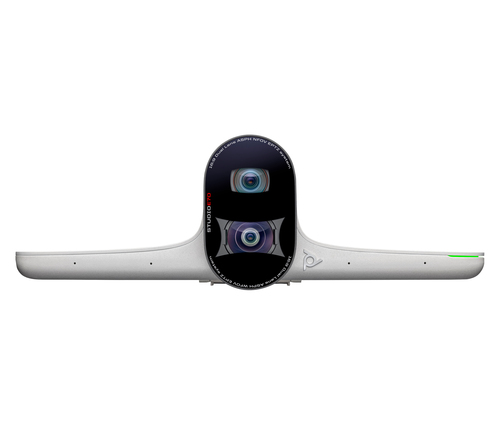
If your team is comparing the HP Poly EagleEye IV USB Camera and Logitech ConferenceCam Connect, the decision mostly comes down to room focus versus mobility. The HP Poly EagleEye IV is a premium HD camera for medium meeting rooms where detail, framing, and a polished presentation matter. It’s the kind of video conferencing camera that makes board updates and client reviews feel more put together. Logitech’s ConferenceCam Connect, on the other hand, is a compact all-in-one unit built for quick setup, small group collaboration, and flexible workspaces. It’s easier to move, simpler to deploy, and often better for teams that don’t stay in one room all day. For broader product research, Logitech’s official ConferenceCam Connect overview is a solid starting point. In short: choose the HP Poly model for room-centered meetings, or the Logitech model when portability and simplicity matter more.
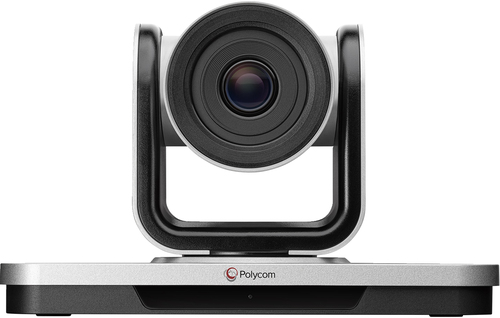
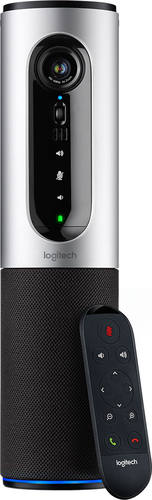
How to Set Up a Video Conferencing Camera Without the Headaches
Start by planning the room. Decide where the video conferencing camera should sit so eye level, table coverage, and screen alignment all work together. Then connect the USB cable directly to the host device and install any required software or drivers. After that, test framing, adjust the field of view, and check lighting from both the presenter and participant angles.
If the camera includes microphones or a speakerphone, pair or verify audio before the first live call. I’d also update firmware, run a test meeting, and confirm platform compatibility with Teams, Zoom, or Google Meet. If the image looks washed out, move the camera away from direct light. If the video stutters, check bandwidth and USB port quality. Small fixes usually solve big headaches. One practical tip: save the setup as a room template so future meetings start faster and with fewer support requests. That little step can save a surprising amount of time over the course of a month.Conclusion
The main idea is simple: the best video conferencing camera is the one that fits the room, the team, and the meeting style—not just the highest-end spec sheet. Premium room cameras usually deliver stronger detail and a more professional presence, while portable all-in-one devices often offer better flexibility and easier deployment. Budget still matters, and premium options aren’t always worth it for smaller teams or occasional users.
If you’re unsure, think about your everyday pain points. Is it poor framing? Awkward installation? Weak audio? Too much setup time before every call? Those are the things that make a camera feel frustrating, even when the specs look fine. In my experience, the right choice usually removes friction instead of adding another device to manage. So take a quick look at room size, usage frequency, and portability before buying. Then compare your options with a clear head and a real use case in mind. If you want to narrow it down today, browse our video conferencing camera category and pick the model that actually improves the workday.Frequently Asked Questions
Common questions about Video Conferencing Cameras