Which Compact Desktop Should You Buy: Mac mini M4 or ASUS NUC 14?
Why are so many people switching to compact desktops now? Simple: they want real power without a giant tower eating the desk. These small systems fit home offices, dorms, creative studios, and front-desk workstations with ease. AI-ready chips, quieter cooling, and lower energy use are making them even more appealing. In my experience, people underestimate workspace until they reclaim it. Let’s break down features, value, and use cases so you can choose confidently—not just by specs, but by real-world fit.
What Makes a Compact Desktop Worth Buying?
A good compact desktop earns its place by doing three things well: saving space, staying quiet, and keeping everyday work smooth. Compared with a full tower, it usually means cleaner cable management, lower power draw, and less fan noise, which matters more than people expect during long workdays. When you’re comparing models, look at CPU class, RAM capacity, SSD speed, display support, wired networking, port variety, and upgrade limits. Those details shape how well the machine handles multitasking, browsing, coding, light content creation, and remote work. Are you after raw horsepower, or a desktop that disappears into the background and just works? Honestly, most people need the second one. Premium options aren’t always the smartest buy if your daily routine is email, spreadsheets, and Zoom. That’s why balancing performance with heat, desk space, and long-term value is usually the winning move. If you’re still researching, our compact desktop category is a solid place to compare options. **Quick win: prioritize 16GB RAM or more if you want the system to stay responsive for years.**
A larger SSD helps too, especially if you keep lots of files locally or hate juggling external drives. In my opinion, the best compact desktop feels like a tool, not a project.Mac mini M4: Small Box, Serious Everyday Performance
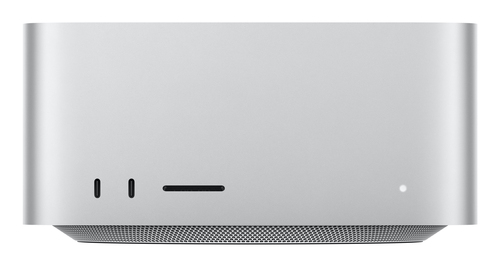
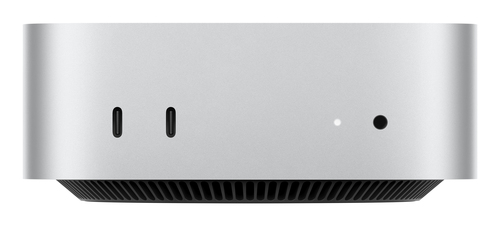
The CTO/Mac mini M4 Silver/M412-16-16/48GB/512SSD/10GigEth/EU Power/NoSW is the kind of compact desktop that makes you pause and think, okay, this is serious. The Apple M4 platform, 48GB of memory, 512GB SSD, and 10 Gigabit Ethernet add up to fast app launches, smooth multitasking, and plenty of breathing room for creative workflows or heavy browser use. If you live inside macOS, or you already rely on iPhone and iPad continuity, the ecosystem can be a huge advantage. Apple’s hardware-software consistency tends to reduce friction, and that matters more than benchmark bragging rights in real life. I’d point people to Apple’s official desktop lineup when they want to see how the ecosystem story fits together.
In my experience, buyers often pay for stability, quiet operation, and polish just as much as raw speed. This model delivers that premium feel. That said, macOS isn’t ideal for every Windows-only app, and this much memory can be overkill for casual users who mostly browse, stream, or do basic office tasks. Still, if you want a machine that feels invisible day to day, the Mac mini M4 is a very compelling compact desktop. It’s especially good for designers, developers, and anyone who values low-drama computing. If you’re comparing workflows, our Apple-focused desktop buying guides may help you narrow the decision.ASUS NUC 14: A Flexible Mini PC for Modern Workloads
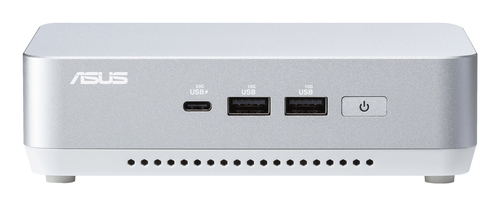
The ASUS RNUC14RVSU5068A2I UCFF Silver 125H is built for people who want Windows flexibility in a tiny chassis. Its Intel 125H platform gives it strong everyday responsiveness, and the UCFF design keeps the footprint small enough for crowded desks, kiosks, reception counters, and shared workspaces. That kind of versatility is why mini PCs keep gaining ground in offices right now—AI-ready hardware, simple deployment, and lower energy use all matter. For a remote worker running multiple monitors, a small business replacing aging towers, or a student working from a tiny desk, this format makes a lot of sense. It’s also a familiar fit for business apps, Microsoft 365, VPN tools, and web-first workflows. I like that it can slot into mixed environments without much drama.
Still, mini PCs are not magic. Cooling, storage, and port layout matter a lot, and poor choices there can make a fast chip feel average. If you need a compact desktop that stays compatible with standard Windows software and office hardware, this ASUS NUC 14 is worth a hard look. I’d choose the software ecosystem first, performance second, because the wrong platform can be more painful than slightly slower specs. For more space-saving workstation ideas, the business desktop category is worth exploring.Which Desktop Fits Which User Best?
If you’re deciding between these two, start with the way you actually work. The Mac mini M4 is the stronger pick for Apple ecosystem users, people who care about premium build quality, and anyone who wants lots of memory headroom for multitasking or creative apps. The ASUS NUC 14 is usually the better fit for users who want Windows flexibility, broader compatibility, and a traditional PC workflow in a very small footprint. That difference matters more than most spec sheets admit. In my experience, teams sometimes overspend on top-tier hardware when a simpler machine would’ve done the job just fine. But the reverse happens too—cheap desktops can become bottlenecks fast. Think about upgrade path, support, monitor pairing, and long-term maintenance. A machine that connects easily to your existing displays and peripherals saves time from day one. Three questions help a lot: What software do you use? How much desk space do you have? And do you want the smoothest ecosystem fit, or the most flexible one?
Once you answer those, the right compact desktop usually becomes obvious.Mac mini M4 vs ASUS NUC 14: A Side-by-Side Look
Side by side, the Mac mini M4 details and ASUS NUC 14 details tell two different stories. The Mac mini M4 brings 48GB RAM, 10 Gigabit Ethernet, and deep macOS integration, which is a real advantage for power users, creators, and Apple loyalists. It feels polished, fast, and low-fuss. The ASUS NUC 14, meanwhile, leans into Windows-first flexibility, a compact UCFF build, and the Intel 125H platform for broad business compatibility. That makes it a strong fit for mixed-device offices and standard corporate workflows. A designer using Final Cut Pro may prefer the Mac mini’s ecosystem and memory headroom. An office user juggling Microsoft 365, browser tabs, and VPN tools may get more practical value from the ASUS. Neither is “better” for everyone. Premium doesn’t always mean more useful. It usually means more aligned with a very specific workflow, and that’s the real decision.
How to Choose and Set Up Your Next Desktop Without Regrets
Start with your tasks: office work, coding, creative projects, media editing, or simple home use. Then match the software ecosystem—if your apps live in macOS, the Mac mini path makes sense; if you depend on Windows-heavy tools, the ASUS NUC is the safer bet. Next, check monitor, keyboard, mouse, and port needs before you buy; missing ports is one of the easiest mistakes to make. After that, choose memory and storage with some cushion. More RAM is usually the better long-term move than a tiny SSD.
Plan the physical setup too: cable routing, Ethernet, and ventilation all matter in small offices and home workspaces. Before moving the machine into daily use, plug it in, update firmware, install OS updates, and test Wi‑Fi or wired networking. A few expert tips: don’t ignore display compatibility, and don’t skimp on storage if you keep photos, project files, or local backups. A smooth setup saves time later, especially when you’re trying to keep a desk clean and productive.Conclusion
Both of these compact desktops solve the same problem: they deliver serious computing power without taking over your desk. They just do it in different ways. The Mac mini M4 is the stronger choice for Apple users, premium workflow consistency, and high-memory performance. The ASUS NUC 14 is the flexible Windows option for people who want broad compatibility, a small footprint, and dependable everyday speed. In my experience, the best desktop is the one that matches your software, your desk, and your future plans—not just the flashiest spec sheet. Compact desktops are such a smart trend right now because they save space, often use less energy, and fit modern work habits better than giant towers. If you’re ready to narrow it down, compare your needs carefully and choose the model that feels like a long-term fit, not a short-term impulse buy. Explore the compact desktop category and make the choice that fits your workflow.
Frequently Asked Questions
Common questions about Desktop